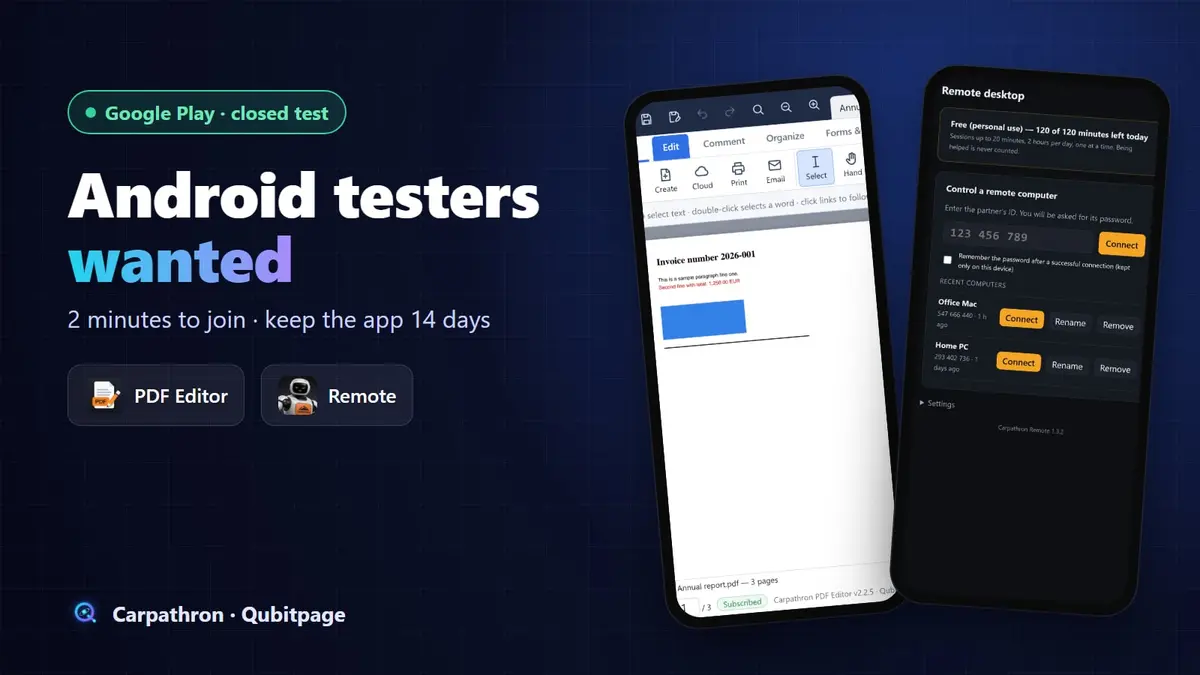
Our two Android apps, Carpathron PDF Editor and Carpathron Remote, are ready for their closed test on Google Play. Before Google lets a new developer account publish an app for everyone, the app has to be tested by at least 12 people for 14 days in a row. That is where we need you.
If you have an Android phone or tablet and two minutes, you can help us launch both apps. Here is what the apps do, how to join and what we ask of testers.
The two apps you can test
Carpathron PDF Editor
A PDF reader and editor for your phone. It has the same structure as the desktop version: Read, Edit, Comment, Organize and Forms & Sign. You can open a PDF, change its text, add comments, rearrange pages, fill in forms and sign documents directly on the phone.
Carpathron Remote
The Android version of Carpathron Remote: control your Windows, Mac or Linux computer from your phone. Enter the computer's ID, confirm with its password and you see its screen, with a keyboard and chat. It is handy when you need a file or a program from your PC while you are away, or when you help someone with their computer.
How to become a tester (2 minutes)
Use the same Google account that is signed in on your Android phone for both steps, otherwise Google Play will not show you the test version.
- Join the tester group. Open groups.google.com/g/carpathron-testers and press Join group. The group is only an access list: nobody can post in it except us, and members cannot see each other's email addresses. After you press Join, the page hardly changes (the group has no messages): that is normal, you are in. Go straight to step 2.
- Opt in for the app you want to test. Open the test page and press Become a tester:
- Carpathron PDF Editor: play.google.com/apps/testing/com.qubitpage.carpathron.pdfeditor
- Carpathron Remote: play.google.com/apps/testing/com.qubitpage.carpathron.remote
- Install the app from Google Play. The test page has a link to the app's Play listing; install it from there like any other app. You can test one app or both.
Does Google Play say "App not available"? Google is still reviewing the opening of the test to the group (this can take from a few hours to a few days). If you have joined the group, you are already on the list: try the Google Play link again later, there is nothing else to do. On a computer with several Google accounts, make sure the Play page is opened with the same account you joined the group with.
What we ask of testers
- Keep the app installed for 14 days. Google counts the testers who stay opted in for 14 days in a row; if someone leaves early, the count starts again.
- Open it now and then and try what interests you: open a PDF and edit it, or connect to your own computer.
- Tell us what does not work. Anything unclear, any crash or missing feature: write to contact@qubitpage.com. You can also leave private feedback on the app's Google Play page.
Good to know
- The test versions are the real apps, with the same plans as the final release. Taking part in the test does not unlock paid features.
- The tester group does not send you emails or newsletters, and we only see that you joined, so that Google Play gives you access.
- You can leave the test at any time from the same Google Play test page.
Thank you
Every tester counts: Google needs at least 12 people for each app before we can publish them for everyone. If you know someone with an Android phone who likes trying new apps, please send them this page. Thank you for helping a small team bring its apps to Google Play.